


Why Self Study Libraries Need ERP Management Software
Running a Self Study Library may look simple from the outside.
Students come, take their seats, study, and leave.
But for a library owner, there is much more happening behind the scenes.
You have to manage:
- Student registrations
- Seat allocation
- Attendance
- Membership plans
- Monthly fees
- Pending payments
- Renewals
- Vacant seats
- Occupied seats
- Student records
- Daily collections
- Reports
- Student communication
When you have 30 or 40 students, managing everything manually may seem manageable.
But what happens when your library reaches 100, 200, 500 or more students?
This is where ERP Management Software for Self Study Libraries becomes extremely useful.
What is ERP Management Software for a Self Study Library?
ERP stands for Enterprise Resource Planning.
For a Self Study Library, an ERP system brings important daily operations together in one digital platform.
Instead of maintaining separate registers for students, attendance, seats, fees, and memberships, you can manage everything through a centralized dashboard.
A modern Self Study Library ERP can help you manage:
- Student Registration
- Seat Management
- QR Attendance
- Fee Collection
- Membership Plans
- Pending Fee Reports
- Attendance Reports
- Seat Occupancy
- Student Portal
- Dashboard Analytics
The main objective is simple:
Less manual work. Better management. More control.
1. Managing Students Becomes Easier
Student registration is one of the first tasks when someone joins your library.
With manual registers, you may need to write and maintain:
- Student name
- Mobile number
- Address
- Joining date
- Membership plan
- Seat number
- Fee details
- Renewal date
As the number of students increases, finding a particular record can become difficult.
With ERP software, student information can be stored digitally and accessed whenever required.
This makes admission management faster and more organized.
2. Smart Seat Management
For a Self Study Library, seats are your inventory. 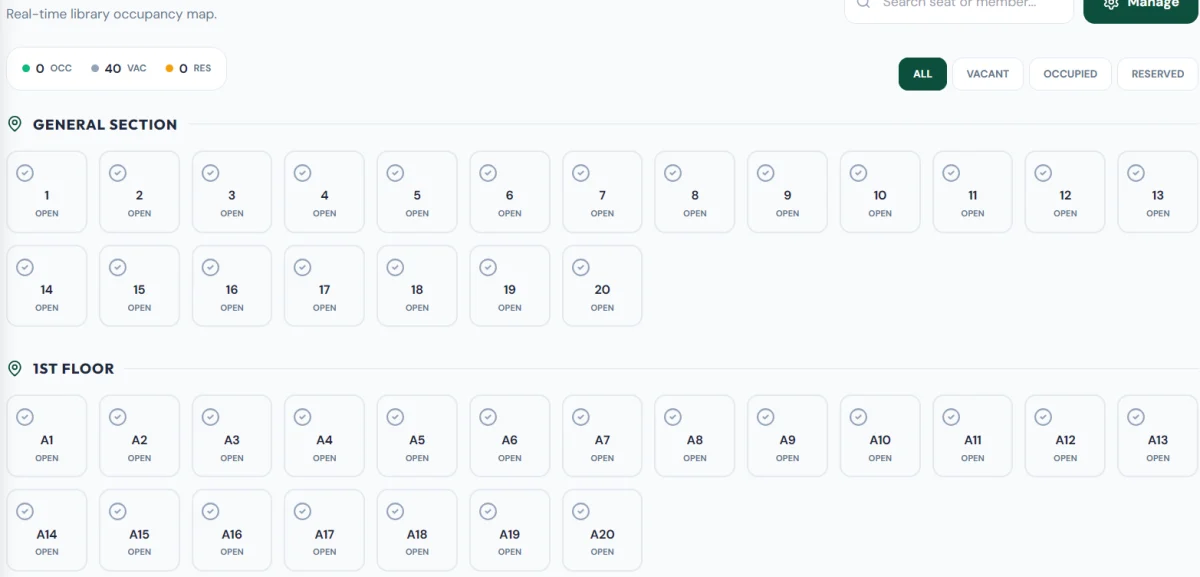
If you have 200 seats, you need to know:
How many are occupied?
How many are vacant?
Which student has which seat?
Which seats are available for new admissions?
A Library ERP can provide a real-time seat occupancy view.
For example:
Total Seats: 200
Occupied: 174
Available: 26
This gives the library owner a clear picture of the current capacity.
It can also help when a new student asks:
"Sir, seat available hai?"
Instead of checking a register manually, you can quickly check your dashboard.
3. QR Attendance Saves Time
Traditional attendance requires students to sign a register every day.
For a library with hundreds of students, maintaining attendance manually can become a daily administrative task.
A QR Attendance System allows students to scan a QR code and mark their attendance digitally.
This can help reduce:
- Manual entries
- Attendance errors
- Paperwork
- Staff workload
The library owner can then view attendance records digitally.
4. Fee Collection Becomes More Organized
Fee management is one of the biggest challenges for Self Study Libraries.
Students may have different:
- Membership plans
- Joining dates
- Renewal dates
- Payment amounts
- Due dates
A Library ERP can maintain these records digitally.
You can track:
Paid Fees
Pending Fees
Upcoming Renewals
Payment History
Monthly Collections
This makes it much easier to understand the financial status of your library.
5. Pending Fee Reports
One of the most useful features for a library owner is a Pending Fee Report.
Instead of manually checking every student record, the dashboard can show which students have outstanding payments.
For example:
| Student | Plan | Amount | Status |
|---|---|---|---|
| Student A | Monthly | ₹1,000 | Paid |
| Student B | Monthly | ₹1,000 | Pending |
| Student C | Quarterly | ₹2,700 | Paid |
This allows the owner to follow up with pending students and maintain better cash-flow visibility.
6. Membership Plans
Different students may prefer different membership options.
You might offer:
- Daily Pass
- Weekly Plan
- Monthly Plan
- Quarterly Plan
- Half-Yearly Plan
- Annual Plan
ERP software can help organize these membership plans and connect them with student records and payment information.
This makes renewals easier to manage.
7. Know Your Library Occupancy
A library owner should know how efficiently the available seats are being utilized.
For example:
Total Capacity: 300 Seats
Occupied: 255
Available: 45
Occupancy: 85%
This information can help you make better business decisions.
If occupancy remains high for several months, you may consider:
- Increasing capacity
- Opening another branch
- Introducing new membership plans
- Expanding the existing facility
8. Reports Help You Make Better Decisions
Running a business only on assumptions can be risky.
A dashboard gives you useful information about your library.
You can track:
- Total Students
- New Admissions
- Active Memberships
- Pending Fees
- Daily Attendance
- Monthly Collections
- Seat Occupancy
- Available Seats
- Membership Renewals
Instead of asking:
"Library kaisi perform kar rahi hai?"
You can look at actual numbers.
Also Read More Related to Library & Reading Room Software Management.
1. Library Fee Collection System: Complete Guide for Self Study Libraries
2. How to Start a Self Study Library in India
9. Student Portal Improves the Experience
A professional library isn't only about managing the owner side.
The student experience also matters.
A Student Portal can allow students to access relevant information digitally, depending on the features provided by the software.
For example:
- Profile
- Membership
- Attendance
- Payment information
- Library-related updates
This creates a more professional experience compared with completely manual management.
10. Less Dependency on Registers and Excel
Registers and Excel can be useful when starting a small library.
But as your business grows, managing everything manually can become increasingly difficult.
You may end up maintaining separate files for:
Students + Attendance + Fees + Seats + Memberships + Reports
An ERP brings these operations into one system.
That means:
One Platform → One Dashboard → Complete Library Management
11. ERP Helps Library Owners Save Time
Imagine spending part of every day on:
- Checking attendance
- Finding student records
- Calculating pending fees
- Checking available seats
- Preparing reports
- Updating registers
These small tasks consume time.
Automation helps reduce repetitive administrative work so that the owner can focus on more important things such as:
- Student experience
- Marketing
- Library facilities
- New admissions
- Business expansion
12. Your Library Can Also Build an Online Presence
Managing your library is only one part of growing the business.
The other important part is getting discovered by new students.
Students frequently search online for terms such as:
- Self Study Library Near Me
- Reading Room Near Me
- UPSC Library
- SSC Library
- Study Library in [City]
- AC Study Library
- 24 Hour Library
A digital library platform can help create a professional online profile for your library.
Your public profile can showcase:
- Library Name
- Photos
- Location
- Timings
- Facilities
- Contact Details
- Membership Information
- Directions
A city-wise library directory can also help students discover libraries in their area.
So the goal isn't only:
Manage Your Library
It can also be:
Manage + Promote + Grow Your Library
Why Library ERP is Better Than Using Multiple Tools
Without an integrated system, a library owner might use:
Register → Attendance
Excel → Fees
WhatsApp → Student Communication
Google Sheets → Student Data
Notebook → Seat Allocation
This creates unnecessary complexity.
An integrated ERP can bring important operations together.
One System
Student Management
↓
Attendance
↓
Seats
↓
Fees
↓
Memberships
↓
Reports
↓
Student Portal
This creates a much more organized workflow.
Who Should Use Self Study Library ERP Software?
ERP software can be useful for:
- Self Study Libraries
- Reading Rooms
- UPSC Libraries
- SSC Libraries
- Banking Exam Libraries
- Competitive Exam Libraries
- Coaching Libraries
- Study Centers
- Public Libraries with membership-based operations
Whether you have 50 students or 500+ students, digital management can make daily operations more organized.
What Should You Look For in Library ERP Software?
Before choosing software, check whether it provides the features your library actually needs.
Important features include:
Student Management
Can you register and manage students easily?
Seat Management
Can you see occupied and available seats?
Attendance
Does it support QR or digital attendance?
Fee Management
Can you track payments and pending fees?
Membership
Can you create different membership plans?
Reports
Can you see attendance, fees, and occupancy reports?
Student Portal
Can students access their relevant information?
Online Presence
Does the platform help your library build a professional digital presence?
Ease of Use
Can you and your staff use it without complicated training?
Why APP ERP Can Be Useful for Self Study Libraries
APP ERP is designed around the operational requirements of modern Self Study Libraries and Reading Rooms.
It combines library management features such as:
- Student Registration
- Library Seat Management
- QR Attendance
- Fee Collection Tracking
- Pending Fee Reports
- Membership Plans
- Library Dashboard
- Attendance Reports
- Seat Occupancy Reports
- Student Portal Access
Along with management, the platform can also support your library's online presence through a professional public library profile and city-wise directory listing.
This gives library owners two important capabilities:
Manage Your Library -- Signup Here.
and
Increase Your Online Visibility
Manage Bhi. Promote Bhi. Grow Bhi.
Also Read this : /blog/best-library-management-software-india
Final Thoughts
A Self Study Library may start with a few students and a simple register.
But when the number of students grows, manual management can become a serious operational challenge.
ERP Management Software helps transform a manually managed library into a more organized digital business.
From student registration and seat management to QR attendance, fee tracking, membership management, reports, and student access, everything can be brought together in one platform.
And when digital management is combined with an online library profile and local directory visibility, the goal becomes bigger than simply managing daily operations.
You don't just manage your library. You build a more professional and discoverable library business.
Frequently Asked Questions
What is Self Study Library ERP Software?
Self Study Library ERP Software is a digital platform designed to manage the daily operations of a study library, including students, seats, attendance, fees, memberships, and reports.
Is ERP software useful for a small library?
Yes. Even a small library can benefit from organized student records, digital attendance, fee tracking, and seat management. Starting digitally can also make future growth easier.
Can ERP software manage library fees?
Yes. A suitable Library ERP can track fee payments, pending fees, membership plans, renewals, and collection reports.
Can I manage library seats through ERP?
Yes. Seat management allows library owners to monitor occupied and available seats and maintain student-seat assignments.
What is the difference between Library ERP and traditional library software?
Traditional library software often focuses on books, cataloging, and circulation. Self Study Library ERP focuses more on students, memberships, seats, attendance, fees, and operational management.
Can Library ERP help attract more students?
Management software itself doesn't guarantee new admissions. However, a platform that also provides a professional online library profile, local directory presence, and visibility features can help your library become easier for potential students to discover online.

.webp%3Falt%3Dmedia%26token%3Ddd51d1e9-0a41-4355-bf05-8e55ab1d2e45&w=3840&q=75)
